You must enter your faculty advisor's official university e-mail address (for example, jdoe@iup.edu or wxyz@iup.edu). Do not enter an alias e-mail address (for example, Jane.Doe@iup.edu). If you receive a message that the contact is not found, then please ask your faculty advisor to log in to IRBManager at least once, and that should resolve the issue. If it still cannot be found, go to the IUP directory and search for your faculty advisor.
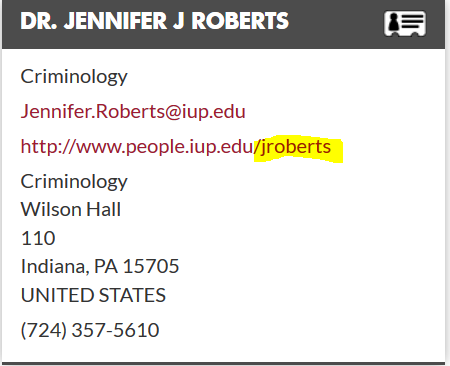
In the example below, you'll see the alias e-mail (Jennifer.Roberts@iup.edu). You do not want this. Instead, use the letters found after the last forward slash / in the http://www.people.iup.edu/ line and add iup.edu after the letters: e.g., jroberts@iup.edu.
Click the red X to the top right of your note and it will be deleted.
If the IRB reviewer or DRB chair requires changes be made by the student and the student makes the changes and submits it, the protocol with the changes are routed to you for your review and signature. It is a requirement for the faculty advisor to review the changes and add his/her signature. If you do not review and add your signature, the protocol will remain in the "Faculty review and signature" stage until this is completed.
Contact your faculty advisor and ask that she or he go into the xForm, check "Requires changes by student before IRB review," and submit it. The xForm will be returned to you, and you will be able to make the corrections.
To find the xForms, you must go into your study record first. Click on the "Start xForm" link. If you are unable to find the information, visit the IRBManager website. Under "For Researchers," click on "How do I submit a Request for Change, etc." It will take you to a pdf tutorial that outlines instructions with screenshots to guide you through the completion and submission process.