Individual Course Withdrawal Policy
Individual course withdrawals provide students who are unable to complete a course with the option of withdrawing from that course. For more details on IUP’s policy regarding individual course withdrawal, please review either the graduate or undergraduate course catalog.
When a student withdraws from the course, a final grade will appear on the transcript as a “W.” The “W” grade will not negatively impact a student’s GPA, but it may cause students to lose financial aid, scholarships, etc. For this reason, it is highly recommended that all students interested in pursuing a withdrawal consult with the Office of Financial Aid and their academic advisor.
How to Add, Drop, or Withdraw from a Course
To add, drop, or withdraw from a course or courses, please follow the instructions below. Additionally, please refer to the academic calendar for the semester in which you are planning to withdraw from a course to see the withdrawal deadline and other important dates for the semester.
In the MyIUP portal:
- Log in to MyIUP and go to Student Class Schedule.
- Select Register for a Class (add, drop, or withdrawal from classes)
- Select the term that the course is in from which you want to withdraw.
- Consult the academic calendar of the specific term for withdrawal deadlines and other important dates.
- Under your schedule summary, select the drop-down in the Action Column.
- Select Web Withdraw from the pull-down (see examples below).
- Click Submit.
The course is now successfully withdrawn from your academic schedule. Remember that withdrawn courses will appear on official and unofficial IUP transcripts as a “W” grade.”
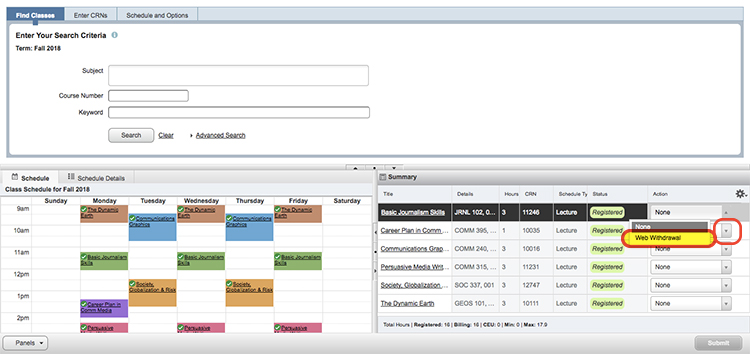
You are now withdrawn from the individual course.
How to Cancel an Upcoming Semester
